
In real-world automation frameworks, how you manage test data and shared setup logic is as important as writing test cases. Poor data handling leads to flaky tests, duplication, and maintenance nightmares. Playwright Test Data Management solves this elegantly using fixtures, test hooks, and environment-based data strategies.
🔹 What Is Test Data Management?
Test data management is the practice of storing, organizing, and reusing test data such as:
- User credentials
- URLs
- API payloads
- Form inputs
- Role-based users (admin, user, guest)
A good strategy ensures:
- Tests are independent
- No hard-coded values
- Easy environment switching
- Minimal duplication
Types of Playwright Test Data Management
Static Test Data (Constants)
This data never changes across executions.
Examples :
- Valid user credentials
- Page titles
- Error messages
- URLs
The best way to store static test data is by creating a json file. As an example we will optimize the framework we created in our previous module (POM implementation) and will seperate test data using json file.
For that, create a users.json file inside testdata folder
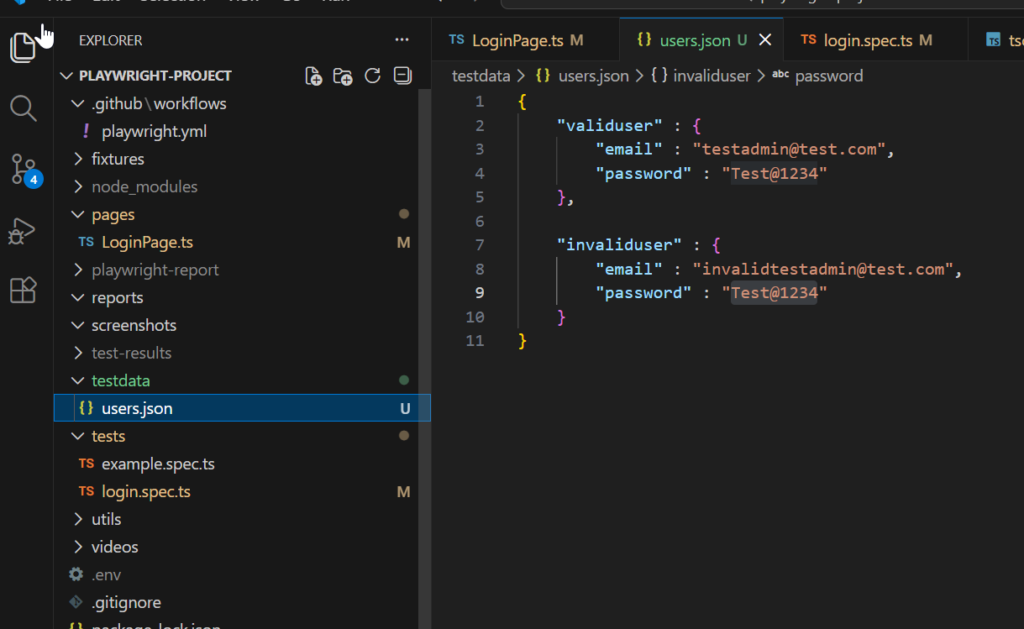
Add following json fields and values in the file. One is a valid user and another is a invalid user , we will use both the test data to test valid and invalid login
{
    "validuser" : {
        "email" : "testadmin@test.com",
        "password" : "Test@1234"
    },

    "invaliduser" : {
        "email" : "invalidtestadmin@test.com",
        "password" : "Test@1234"
    }
}
No changes need to be done in page object file LoginPage.ts since we are not using any test data’s there.
The major changes will happen inside login.spec.ts, since in previous module we passed the test data from here like this:await loginpage.login('testadmin@test.com', 'Test@1234')
Now since we have created users.json file to store email and password , we don’t need to hard code the test data inside file. Therefore we will pass the test data as :
import users from '../testdata/users.json';
//For testing valid login
await loginpage.login(users.validuser.email, users.validuser.password);

//For testing invalid login
await loginpage.login(users.invaliduser.email, users.invaliduser.password);
import users from '../testdata/users.json';
This line imports test data from a JSON file named users.json, which is stored inside the testdata folder.
The users variable now holds the entire JSON object, allowing the test to access different user records such as valid and invalid login credentials
await loginpage.login(users.validuser.email, users.validuser.password);
This line calls the login method from the Login Page Object and waits for it to complete before moving forward. The email and password values are fetched from the validuser object inside the imported JSON file.
users call the json file, then validuser calls the object, and then email fetches the value of the email field.
await loginpage.login(users.invaliduser.email, users.invaliduser.password);
This line again calls the same login method, but this time it passes invalid user credentials from the JSON file.
The email and password values are fetched from the invaliduser object inside the imported JSON file.
Now we have 2 test cases for login inside login.spec.ts , one for valid and another for invalid login :
import { test, expect } from '@playwright/test';
import { LoginPage } from '../pages/LoginPage';
import users from '../testdata/users.json';

test('valid login', async ({ page }) => {

  const loginpage = new LoginPage(page);

  await loginpage.navigateToHomePage();
  await expect(page).toHaveTitle(/QATestAcademy Automation/);

  await loginpage.navigateToLoginPage();

  await loginpage.login(users.validuser.email, users.validuser.password);
  await expect(page).toHaveURL(/products/);

});

test('invalid login', async ({ page }) => {

  const loginpage = new LoginPage(page);

  await loginpage.navigateToHomePage();
  await expect(page).toHaveTitle(/QATestAcademy Automation/);

  await loginpage.navigateToLoginPage();

  await loginpage.login(users.invaliduser.email, users.invaliduser.password);
  await expect(page.getByText(/Invalid email or password/)).toBeVisible();

});
While the framework is good enough now , to test Login scenarios but in a web application we would have multiple scenarios to test in a logged state. Therefore we need to make this login method reusable and also passing login credentials from inside a code is not a safe menthod.
Next module we will further discuss about some more playwright test data management strategies to make the login method reusable and safe