
In last chapter , we created the required page objects Product.ts and ViewCart.ts, now we will use these page objects to create test case in Orders.spec.ts
const product = new Products(loggedinpage);
const cart = new ViewCart(loggedinpage);
As you can see above, we have created instances of product and viewCart pages.
const alerts: string[] = [];
expectAlert(loggedinpage, alerts);
Now, these two lines are used to handle alerts . First line creates an empty array of string and the second line calls a function for alert which we will create in utils folder. expectAlert function acts as a listener , it waits for the alert and then captures the message from alert dialog and saves it in the alerts variable. We will later use this alerts to validate the alerts message.
We will create a file called alertUtils.ts in utils folder and will create the function
import { Page, expect } from '@playwright/test';

export function expectAlert( page : Page, messages : string[]){
    page.on('dialog', async(dialog) =>{
        messages.push(dialog.message());
        await dialog.accept();
    });
}
Here, if you see we are giving messages.push method. It pushes the messages from the alert dialog and saves it in alerts variable which we will use later to validate the alert message. After that we accept the alert using dialog.accept.
await expect(loggedinpage).toHaveURL(/products/);
await product.addToCart('Playwright Book');
await product.addToCart('API Testing Guide');
await expect.poll(() => alerts.some(msg => msg.includes('Product added to cart'))).toBeTruthy();
We now verify that we are in products page , add two products and each time we add a product we get an alert for which we already have set a listener . expect.poll repeatedly checks for a condition until it becomes true, and the condition here is we validate the message inside alert.
await product.openCart();
await expect(cart.getProduct('Playwright Book')).toBeVisible();
await expect(cart.getProduct('API Testing Guide')).toBeVisible();

await expect(cart.getProductQuantity('Playwright Book')).toHaveText(/1/);
await expect(cart.getProductQuantity('API Testing Guide')).toHaveText(/1/);

await expect(cart.getProductPrice('Playwright Book')).toHaveText(/499/);
await expect(cart.getProductPrice('API Testing Guide')).toHaveText(/299/);

await cart.increaseQuantity('Playwright Book');
await expect(cart.getProductQuantity('Playwright Book')).toHaveText(/2/);
Since we have added the product, now we navigate to carts page and verify if the product is added and its showing the correct price and quantity. We increase the quantity of one product using the + option and verify if the quantity is increased.
await cart.buyProduct();
await expect.poll(() => alerts.some(msg => msg.includes('Items have been placed for delivery'))).toBeTruthy();
Now, we click on buy product which triggers another alert. We already have a listener at the top which listens to the alert and it pushes the message from the alert. We validate the message here.
We run the test case using ‘npx playwright test tests/orders.spec.ts’ and once the run is successfully complete you can see the report using ‘npx playwright show-report’
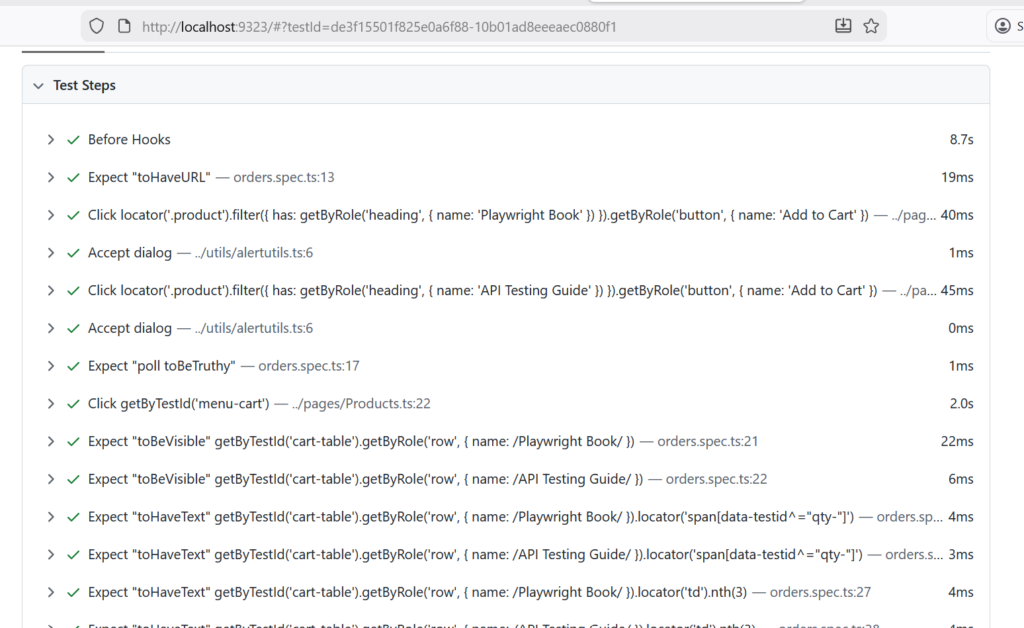
This completes the whole flow of the playwright end to end testing.
You can download the whole project from the github.